Hungry Dog Roams the ZX81 Screen
A hungry dog takes over the ZX81 screen while a simple PRINT AT routine preserves a changing message behind the image.
To pass the time, I’ve been creating pixel art on the ZX81 using a screen editor. One of the images, a hungry dog with a background message, became inspiration for a short animation program. Unlike most of my image programs, the text remains visible behind the dog, almost as though the image has a transparent background.
# Filling the screen with text.
My original plan was to use one of the image compression or plotting routines I have used in previous programs. My first thought was to use the routine from the MONO LISA program. The hungry dog needed the bottom two lines, so I expanded the display using POKE 16418,0. So far so good.
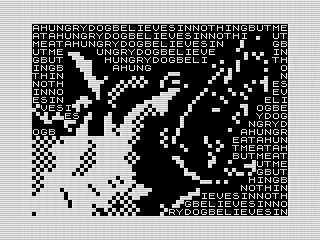
Unlike that image, which used spaces and inverse spaces, the hungry dog used the ZX81’s more detailed resolution with four pixels per character. In BASIC, you would normally use PLOT. Unlike PRINT AT, PLOT ignores the expanded display. So that approach wouldn’t work.
 Hungry Dog, ZX81 Screenshot, 2026 by Steven Reid
Because of the detail, using the RLE routine really didn’t provide much compression, as each character tended to be unique. Plus, I did not want the image to erase the message behind it. The goal was to treat some of the image as transparent, leaving the existing screen contents untouched. That would require adjusting the routine to account for it.
Rather than getting too fancy, I fell back to using PRINT AT to draw only the visible parts of the dog. The code became much simpler, and the image displayed much faster.
# Making the message fit.
The part where I did get a little fancy was filling the screen with the message. Since the text can vary in length, I needed a routine that could repeat any string until the entire display was covered.
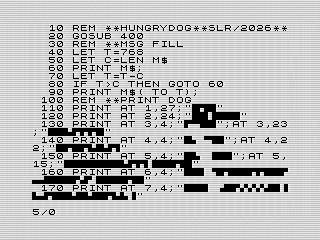
40 LET T=768
50 LET C=LEN M$
60 PRINT M$;
70 LET T=T-C
80 IF T>C THEN GOTO 60
90 PRINT M$( TO T);
The expanded display contains 768 character positions, so T starts at 768. The program stores the length of the message in C, prints the complete string, and subtracts its length from the available space.
 Hungry Dog, Listing for screen fill and image, ZX81 Screen shot, 2026 by Steven Reid
As long as more than one complete copy will fit, the program returns to line 60 and prints it again. Once the display is nearly full, line 90 uses a string slice to print only the characters needed to fill the remaining space.
It is a small routine, but I like how elegantly it handles messages of different lengths. There is no need to pad the strings or adjust the routine for each one. The routine is also fast, which is a pleasant surprise given how slow previous routines had been.
# Choosing a random message.
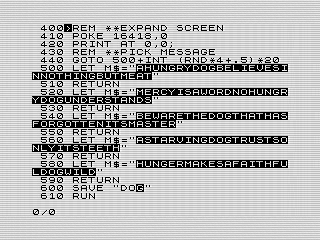
To add a little variety, I included five different messages. The program selects one using a random number and a calculated GOTO.
440 GOTO 500+INT (RND*4+.5)*20
In this case, there are five messages, using values from 0 through 4. I probably didn’t need the +.5 before the INT, but it works, so I left it in. The calculation produces one of five line numbers from 500 through 580, with each message beginning 20 lines after the previous one.
500 LET M$="AHUNGRYDOGBELIEVESINNOTHINGBUTMEAT"
510 RETURN
520 LET M$="MERCYISAWORDNOHUNGRYDOGUNDERSTANDS"
530 RETURN
540 LET M$="BEWARETHEDOGTHATHASFORGOTTENITSMASTER"
550 RETURN
560 LET M$="ASTARVINGDOGTRUSTSONLYITSTEETH"
570 RETURN
580 LET M$="HUNGERMAKESAFAITHFULDOGWILD"
590 RETURN
After selecting the message, the program returns to the screen-filling routine. The dog is then printed over the text one row at a time. As noted before, the PRINT AT skips over any transparent sections within the image. This allows the message to show through without needing a separate transparency or masking routine.
 Hungry Dog, List of messages, ZX81 Screen shot, 2026 by Steven Reid
# Letting the image bite.
If I wanted to get fancy, I would probably rewrite the routine using machine code. I have a custom plot routine, used in many previous programs, that can use the full display. The compression routine would be a fun challenge. I’ve done something similar before, so it wouldn’t be too hard.
Thinking about it, another interesting effect, assuming the code is fast enough, would be to shift the message behind the image. To keep it fast enough, I would probably copy the characters directly into the display. It wouldn’t be hard to shift the message in BASIC, but the animation wouldn’t be nearly as smooth.
The program as written generates a simple effect, but it feels quite different from my other ZX81 image programs. Sometimes falling back to PRINT AT turns out to be exactly what the program needs.
Want to see it in action? You can run the program, or view the code if you’d like to see how it works.