Recreating Trap or Gold on the ZX80
Recreating Trap or Gold on the ZX80 became a lesson in primitive BASIC, quirky graphics, and just how much the ZX81 improved on its older brother.
Looking for a challenge, I decided to rewrite Trap or Gold for the more primitive ZX80. Although similar to the ZX81, its original 4K ROM provided a much more limited version of BASIC. Not to be deterred, I set out to see how games might work on the ZX81’s older brother.
# Giving the ZX80 a chance.
Never having owned a ZX80, it has always intrigued me. I knew it didn’t have a persistent display, which would hamper writing any sort of arcade game. As such, I decided to focus on more turn-based games. Trap or Gold seemed like a good candidate since it had limited graphics and no time-sensitive input.
I was also aware that the ZX80 only used integers. In a way, this made some parts of the program faster, since printing an integer is much less complex than printing floating-point values. Outside of some character differences, I mostly assumed it would be similar to writing a ZX81 program. I quickly learned that wasn’t the case.
First off, I didn’t realize the only way to display the screen was to wait for an INPUT. There is no equivalent to the PAUSE command. There are articles floating around on how to work around that, but I was trying to stick with what BASIC could do. Apparently, not much.
I was also naive in thinking you entered programs much the same way as on the ZX81. Yes, it has keywords on the keys, though sometimes they’re spelled differently. Those keywords, however, are not on the same keys. For example, I constantly kept hitting K instead of A for LIST. Muscle memory runs deep.
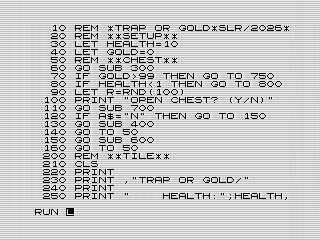 Trap or Gold, Loading the program on the ZX80, 2026 by Steven Reid
# Getting into coding.
Not letting the differences deter me, I dived into converting Trap or Gold to ZX80 BASIC. I quickly hit the bottom of the pool. After a few minutes of trying to figure out how to manage the screen, I discovered that pausing the display wouldn’t be my only challenge. Getting characters on the screen would be just as difficult.
In some ways, the ZX80’s PRINT command is more flexible. The comma prints eight spaces instead of 16. This makes formatting easier, especially given the lack of a TAB function. Worse, though, was the lack of AT. This meant that any sort of graphics would be difficult. To be fair, that was already true because of the lack of easy ways to update the display. It meant thinking differently about how to present everything.
# Displaying a chest.
Focusing on a more static display, I decided to break it into separate routines. First there was a title screen which displayed the game marquee as well as your current statistics. It also cleared the screen.
Afterward, I created routines for the various chest states. The chest starts closed, so I began with that. This was also where I used RANDOMIZE to seed the random number generator. That part was fairly straightforward.
The chest graphics themselves are where I ran into trouble. I assumed, wrongly, that all of the graphic characters were available from the keyboard. Although the ZX80 has most of the same symbols, it lacks a way to enter them all directly. Instead, you need to use the CHR$() function to display the ones that aren’t available from the keyboard.
Easy enough, I thought. I found their codes in the BASIC manual and set off printing them. But I couldn't find where CHR$ was on the keyboard.
Frustrated, I dug deeper into the manual and, after quite a bit of reading, learned that the ZX80, unlike the ZX81, has a few functions that you actually type out. CHR$() is one of them. The ZX80 hadn’t yet figured out all of the keyboard tricks that the ZX81 would later introduce, so it had to get creative. In case you didn’t realize, these functions require parentheses. The real-time syntax checker will quickly tell you when you aren’t doing it right.
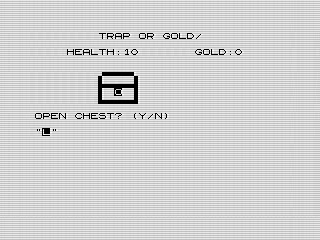 Trap or Gold, Running on the Sinclair ZX80, 2026 by Steven Reid
Since the bottom of the chest is the same for all the graphics, I created a separate routine for it. That way, when I needed to print the open chest, I could simply jump to the common code instead of typing it again. Did I mention the ZX80 only has 1K of memory?
# Game mechanics.
With the display mostly figured out, I reworked the game flow. Lacking any sort of INKEY$—and you wouldn’t see anything even if it had one—I reverted to using a string INPUT. The result wasn’t bad. Plus, you can just press NEW LINE without having to type anything.
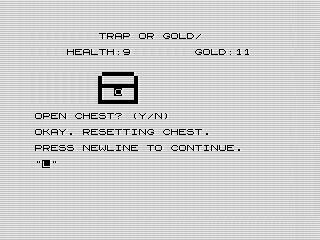 Trap or Gold, Leaving the chest unopened, 2026 by Steven Reid
Since creating an animated lid opening was out of the question, I added a second display for opening or not opening the chest. If you decided not to open it, the game would print a few lines before resetting the chest and then continue.
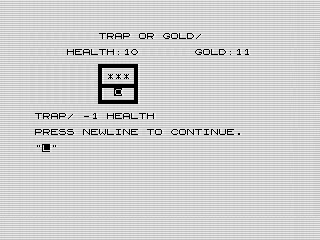 Trap or Gold, Triggering a trap, 2026 by Steven Reid
If you did open the chest, the same logic as the ZX81 version would kick in. Like before, your fate is decided before you press a key. As a side note, RND() is also a typed function. If you chose not to open the chest, the game would simply say so and continue. Otherwise, it would reveal whether you found gold or triggered a trap. The appropriate chest graphic would be displayed, and your health or wealth adjusted accordingly.
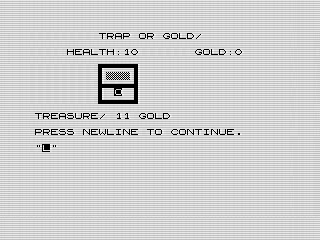 Trap or Gold, Finding gold in the chest, 2026 by Steven Reid
The actual win and loss checks are done after you press NEW LINE again. At that point, you’ll see your updated statistics and the game will decide whether you continue. If not, it jumps to the appropriate ending. Otherwise, you keep playing.
# Packaging it all up.
The last part was saving the program. Again, I had to learn a few things. For one, there isn’t an easy way to automatically run the program. I tried the ZX81 trick of saving while the program was running, but no luck. The other thing I noticed is that the screen state is saved as well. My first save was somewhere in the middle of the program listing. I did a quick HOME before saving so that you would at least see the title after loading.
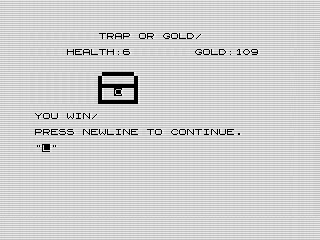 Trap or Gold, Winning the game, 2026 by Steven Reid
With that done, the game was complete. For the most part, it plays identically to the ZX81 version. In a way, it felt more like programming in assembly language than BASIC. The overall logic and flow felt very similar. I tried to make the code as readable as possible with longer variable names, though that means you’ll need a 1K RAM pack or larger. The program itself is only about 1K, but you’ll still need more than a 1K RAM pack because the saved display and stack need additional memory. Loading it into a 1K machine will overwrite the stack and crash.
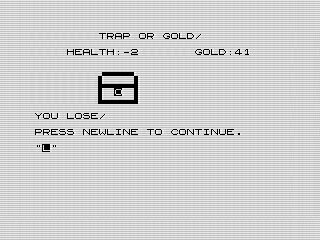 Trap or Gold, Losing the game, 2026 by Steven Reid
Overall, it was a fun learning experience. It made me appreciate how much better the ZX81 was, even if it seems primitive compared to the Spectrum that would follow a year later. As basic as the ZX80 was, it was still a capable machine, and there are plenty of programs that would work just fine on it.
Want to try it out? You can run the program, or view the code if you’d like to see how it works.