Flocking Around With Z80 Assembly on the ZX81
Inspired by a flock of starlings and a Boids simulation, I created a simple bird animation for the ZX81 using Z80 assembly and AI assistance.
Driving home, I happened to see a murmuration of starlings flying over the road. It was something I don't often see anymore in the suburbs. Coincidentally, I also ran across a Boids simulation. Inspired by both, I thought it would be fun to create something like it on the ZX81.
# Watching the birds.
I first spotted the flock while driving home and tried to get a picture at a stoplight, but they were hard to see through the windshield and glare. Fortunately, they were still swirling overhead when I arrived home. I quickly parked and captured a video. Watching all those birds move together was fascinating.
Naturally, my next thought was to convert the idea into a ZX81 program.
Looking into flocking simulations led me to Boids. The basic idea is that each bird follows a few simple rules based on the birds around it. Together, those rules create movement that simulates the behavior of a murmuration.
The final program does a decent job of showing off the flocking and swarming. There are enough birds to make it interesting, while remaining faithful to the simulation. I wasn't looking for perfection.
# Getting back to the code.
I started working on Birds back in January 2025. I knew it would need to be written in assembly to have any chance of running fast enough. There is quite a bit happening as each bird moves around the screen. Although very flexible, the ZX81’s math routines would be way too slow to write the program in ZX81 BASIC.
Jumping into coding, I managed to get the birds moving, but progress stalled. I needed some super-fast math routines to make the birds fly. My attempts at the time weren't yielding the results I had hoped for. I moved on.
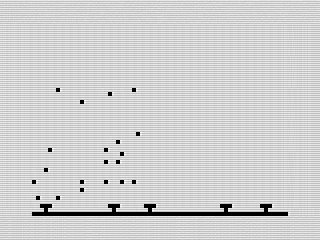 Birds, ZX81 Screenshot, 2026 by Steven Reid
Coming back to an old assembly program can be challenging. It takes a bit of time to figure out what everything does and where you left off. This time, I decided to leverage AI to help me work through the routines and clean up the program.
Using AI was helpful, but not perfect. I still needed to test the changes, fix problems, and decide how I wanted the program to behave. Where it really helped was with iteration. Once I had the basic program working, I could make changes much faster and focus on getting it to look the way I wanted.
# Planting some trees.
With the birds flying around, the screen looked a bit empty. I had the idea of adding trees along the bottom to give the scene a little more depth.
The trees use random placement, so the display looks a bit different each time the program starts. They don’t do anything, but they make the birds look like they are flying over a landscape instead of moving around an empty screen. It is a simple addition that adds depth.
# Reducing the flicker.
My original program erased the screen and redrew all the birds for each frame. It worked, but caused more flicker than I would prefer. The new version erases only the birds at their previous positions before drawing them again. Since the program no longer clears the entire display, the trees remain in place and the animation has a lot less flicker.
I thought about using a double buffer, but decided not to bother. It would require more memory and add another layer of complexity. Erasing and redrawing only the birds worked well enough for what I wanted.
# Adding more birds.
With everything working, I kept increasing the number of birds. Too few didn’t look much like a flock. Too many made the program noticeably slower. I eventually reached a point where the flock looked busy without making the animation too slow. There is still a limit to how much the ZX81 can do, even with the program written in assembly.
The final version also lets you press a key to restart the simulation. This clears the display, creates a new set of trees, and starts the birds again.
# Future thoughts.
I had a few other ideas. One was to scroll the screen back and forth as the birds reached the edges. I also thought about adding some clouds. Both would make the scene more interesting, but they would also add more screen updates and more opportunities for flicker.
A more practical option would be to include routines to adjust the parameters: the number of birds, their speed, etc. This would give the user something to experiment with. It wouldn’t be too hard a task, but I decided to keep this version simple.
# Letting the birds fly.
I’m glad I returned to Birds. What started as a quick experiment last year eventually became a fun little ZX81 animation. I also got to see how generative AI has improved over the last year, making it easier to iterate on my ZX81 programs.
It isn’t a complete simulation of a murmuration, but it does put a flock of birds on the ZX81. That works for me.
Want to see it in action? You can run the program, view the ZX81 listing, or dig into the assembly code.