Teaching a Hungry Dog New Tricks on the ZX81
Hungry Dog 2 rewrites my original ZX81 BASIC program in Z80 assembly, adding a smoothly moving background, changing messages, and double-buffered animation.
When I finished Hungry Dog, I mentioned that an assembly version might be fast enough to move the message behind the image. I decided it was time to find out. Hungry Dog 2 takes the original BASIC idea and gives the background some much-needed speed.
# Teaching an old dog new tricks.
The original Hungry Dog began as a bit of ZX81 pixel art. A message filled the display, and the dog was drawn over it using a collection of PRINT AT statements. By printing only the visible portions of the dog, the message remained visible through the gaps.
It created a nice effect, but there was not much room for animation. BASIC could fill the display quickly enough for a static image, but repeatedly rebuilding the screen would be another matter.
At the end of that project, I had the idea of moving the message behind the dog. Rather than simply scrolling in one direction, I wanted it to bounce back and forth. It would begin slowly, speed up across the display, and then slow down before reversing direction.
That sounded like a job for assembly.
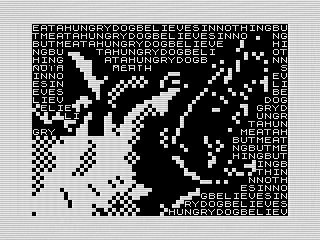 Hungry Dog 2 with its moving message, ZX81 Screenshot, 2026 by Steven Reid
# Building the screen in the background.
The BASIC program writes its message and dog directly to the display. Hungry Dog 2 takes a different approach.
A complete ZX81 display is constructed in a separate frame buffer. The message is drawn first, followed by the dog. Once the frame is ready, a single LDIR copies the entire buffer to the live display.
This prevents the viewer from seeing the two drawing passes. Without the buffer, the background could briefly appear without the dog or parts of the dog might become visible while they were still being drawn. Preparing everything away from the screen makes each update appear as a completed image.
The buffer has to follow the ZX81’s display-file format. It begins with a $76 HALT byte, with another HALT after each 32-character row. The initialization routine installs those bytes once. The drawing routines then skip over them while filling all 24 rows.
It is only 793 bytes, but it makes a big difference.
# Filling a moving display.
The original BASIC routine repeatedly printed a string until it filled all 768 character positions. The assembly version does something similar, although it writes directly into the frame buffer.
Each of the five messages ends with a zero byte. When the drawing routine reaches that byte, it moves back to the beginning of the message and continues filling the display. This lets messages of different lengths repeat without needing any padding.
The starting point within the message changes for each frame. Moving that point makes the text appear to slide behind the dog, even though the complete background is being rebuilt every time.
The routine also skips each row terminator as it moves through the buffer. That small detail keeps the display valid while still allowing the text to flow continuously from one row to the next.
# Picking up speed.
My first thought was to move the background one character at a time and change the delay between each move. Longer pauses at the edges and shorter pauses in the middle would create the acceleration effect.
It worked in theory, but it made the motion feel uneven. It also meant the keyboard was checked less often during the slower parts of the animation.
The better solution was to keep the frame delay constant and use an 8.8 fixed-point position. The high byte holds the visible character position, while the low byte accumulates the fractional movement between positions.
This lets the program move by part of a character on each update. Even though the ZX81 can only display the text at whole-character positions, the fractional value is preserved until enough movement has accumulated to advance it.
A table controls the speed at each point in the journey. The text starts at one-quarter of a character per frame and accelerates to three-and-three-quarter characters per frame near the middle. The second half of the table mirrors the first, slowing the message as it approaches the opposite edge.
Allowing the program to jump several character positions was important. My first speed curve was smooth, but much too polite. A hungry dog apparently prefers its text to move with a little more enthusiasm.
At either edge, the position is clamped and the direction reverses. The result is a background that eases into motion, races across the middle, and slows before bouncing back.
# Drawing around the dog.
The dog is not stored as one large rectangular block. Instead, its data is organized into records containing a row, column, length, and the characters to copy.
This is the assembly equivalent of using separate PRINT AT statements in the BASIC version. Only the visible fragments are placed in the frame buffer. Anything between those fragments is left alone, allowing the moving message to show through.
Using short records also avoids storing a large number of transparency markers. The routine finds the correct position in the buffer and uses LDIR to copy each fragment. A $FF row value marks the end of the data.
The drawing routine uses HL, DE, and BC rather than the Z80’s index registers. Avoiding IX and IY is generally a good idea on the ZX81, especially since the ROM and display system have their own expectations for those registers.
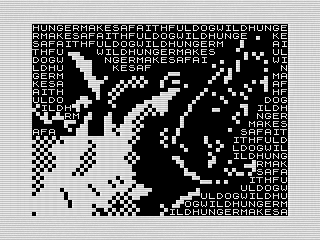 Hungry Dog 2 with a different background message, ZX81 Screenshot, 2026 by Steven Reid
# Changing the dog’s thoughts.
Hungry Dog 2 retains the five sayings from the BASIC program. The initial message is selected using the ZX81’s frame counter as a lightweight source of variation.
The program also changes the message automatically. A countdown waits between 256 and 511 animation frames before requesting the next saying. The frame counter varies the length of the next interval so the changes do not feel completely mechanical.
You can also press any key other than SPACE to change the message yourself. SPACE exits the program.
The keyboard check happens throughout the delay instead of only once per frame. When another key is found, it sets a flag. The actual message change waits until the delay routine has returned normally.
That distinction is important. Jumping out of a nested routine would leave return addresses on the stack. Deferring the change keeps the call stack intact and makes the input handling much safer.
The program also waits for the key to be released before continuing, preventing a single press from racing through several messages.
# More than a faster rewrite.
The finished assembly listing is more involved than the BASIC program, but it does more than reproduce the original image.
The separate frame buffer keeps the animation together. The fixed-point position allows smooth acceleration without changing the frame rate. The speed table gives the movement some personality, while the fragment-based dog data preserves the transparent effect that made the original image interesting.
Assembly provided enough speed to turn what had been a static display into a constantly changing animation. It is still the same hungry dog, but now the words behind it are trying to escape.
Want to see it move? Run Hungry Dog 2 or dig through the assembly listing to see how it works.