Drawing the Mono Lisa on the ZX81
A ZX81 picture routine that uses a single encoded string and RLE-style printing to slowly draw MONO LISA on screen.
Sometimes a small ZX81 program can still feel like a magic trick. My latest program, MONO LISA, builds a simple picture of the Mona Lisa from a single encoded string using a compact run-length encoding (RLE) style routine. It is definitely slow, but that is part of the charm as you watch the image draw itself across the screen.
# A whole picture in one string.
The idea for this one came from a design shared on one of the BASIC forums, originally from an old magazine. A simplified version of the Mona Lisa, this black-and-white picture uses only large black or white blocks. Instead of storing a large block of screen data—as I’ve done using PRINT before—the entire image is packed into a single string and decoded as the program runs.
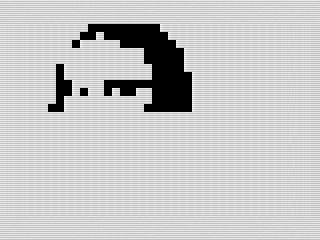 Drawing routine in progress, Mono Lisa, ZX81 Screenshot, 2026 by Steven Reid
That fits the ZX81 well. Memory is tight, and the ZX81 lacks DATA statements. Keeping everything in one string keeps the program compact and easy to move around, even if it shifts some of the work into the decoding routine.
# A simple encoding trick.
To minimize memory, each character in the string represents a run length. The program reads the character, converts it into a number, and then prints that many positions on the screen. Rather than using ASCII, this is all based on ZX81 character codes.
Because the ZX81 uses inverted characters as part of its display set, it becomes very easy to test what kind of run you are dealing with. A check with IF A$>"Z" is enough to determine whether the character is inverted. From there, the routine switches between printing spaces or filled blocks.
I also didn’t bother encoding line breaks. The routine just prints continuously and lets the ZX81 screen wrap naturally, which keeps the data and code shorter. The trade-off is that it was a bit trickier to encode.
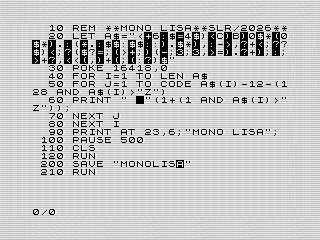 Listing for Mono Lisa, ZX81 Screenshot, 2026 by Steven Reid
After cleaning things up, the core routine ended up being just five lines of BASIC to uncompress and print the data in A$. The rest of the program is mostly control flow, REM statements, and save logic.
For those not familiar with the ZX81, the POKE 16418,0 on line 30 expands the screen, allowing the use of the last two lines. I don’t normally do this, but since the original graphic used 24 rows, I thought it was a good use.
# Hand coding the data.
I spent a fair amount of time trying to keep the program readable while still keeping it short. The routine itself is straightforward, but the data is where things get tricky.
I probably should not have hand coded it. Lining up the runs, making sure the transitions were correct, and keeping everything consistent across what would visually become rows took more effort than expected. Fixing one section often meant shifting another.
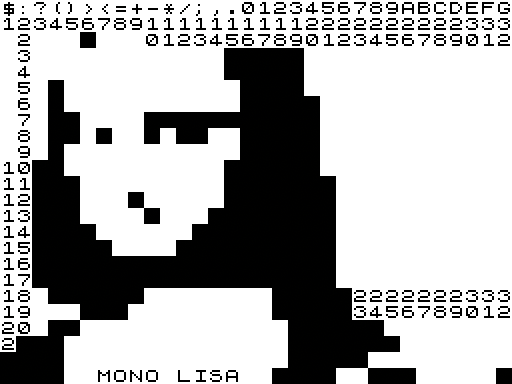 Drawing routine in progress, Mono Lisa, ZX81 Screenshot, 2026 by Steven Reid
To keep things straight, I recreated Mono Lisa in an online screen image tool. This made it easier for me to track the needed runs in the image. That made things much more manageable, even if I still tweaked parts of it by hand.
# Slow, but fun to watch.
This would be much faster in assembly. My Cat Animation is a good example of how quickly this kind of routine can run when it is moved out of BASIC and into machine code. Like Mono Lisa, that program uses RLE to decode and display each frame on the screen.
Still, I do not mind the speed here. In fact, I think it helps. Instead of instantly showing the final image, MONO LISA slowly draws itself across the screen. You get to see the structure of the picture as it appears.
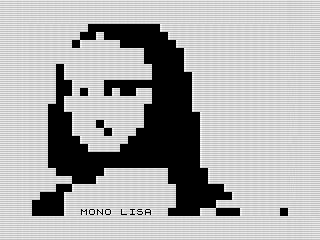 Finished Mono Lisa, ZX81 Screenshot, 2026 by Steven Reid
# A small but fun experiment.
This is one of those programs that shows how far you can get with a simple idea on the ZX81. A single string, a small decoding loop, and a bit of patience are all it takes to build something interesting.
One potential modification is to move from using PRINT to PLOT. This would allow a bit more detail, but at the cost of tracking X/Y locations.
It is not the fastest way to do it, but it is a fun one. And sometimes that is enough.
Want to try it out? You can run the program, or view the code if you’d like to see how it works.