Building a Flip-Style Digital Clock on the ZX81
A flip-style digital clock for the ZX81, built in BASIC by counting frames and working around its many quirks.
I’d been thinking about writing a better clock program for the ZX81 for some time but never acted on it. That is, until yesterday when I saw a flip-style digital clock program on the C64. The result is a sort of digital flip clock program for the ZX81 that ended up being quite a fun journey.
# Programming a clock without a clock.
First off, I should note that the ZX81 doesn’t have a clock. It does have a crystal oscillator in the ULA chip, but don’t expect miracles. It works, but it will drift. The irony isn’t lost on me that Timex sold a number of these in the US and these things don’t keep on ticking. Marketing aside, you aren’t going to get a great clock.
Thus, the way to do this is by counting frames, which the ZX81 makes easy through a system variable. This isn’t a new concept and is used by other games as well. But that was where my brain was stuck, as I don’t use it much in BASIC. I decided to focus my attention there. At this point, I started to build a very basic digital clock with a few input statements. The prototype worked, but it was boring.
One thing I did early on was to make sure the clock worked on both the PAL and NTSC versions. The ZX81 has a system variable I could read to adjust the frames per second. As a note, the clocks are highly imprecise, so you might need to nudge it a bit. I originally had some routines built in to do that manually. They proved too slow and I decided to drop them from the final version.
# Sprucing up the clock.
The goal was to build a more interesting clock with larger digits. This required a lot of trial and error to see what worked fast enough. Given the frame counter only gives me about 4–5 seconds, I needed a fast print routine. The first version required breaking apart digits and printing each number using simple print routines. This worked, but wasn’t very fast.
My next version used arrays to hold strings. There are multiple ways to do this. You can use flat arrays and split them, which is easy to enter but proved slower. Or you can create a multidimensional array and print each row of the digit. This was marginally faster, so I stuck with it.
As a note, during development I displayed the seconds. Although this worked, it tended to skip seconds—something I adjusted for in the routine. It still looked awkward, so I dropped it later. I also played around with blinking colons, leaving that in the final version to give some visual feedback that things were working.
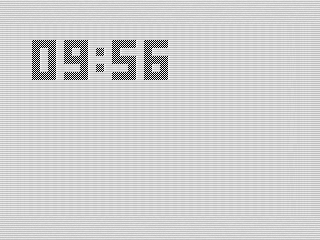 Flip Clock, Running, ZX81 Screenshot, 2025 by Steven Reid
The final version made a couple of minor changes. I didn’t like the slow incremental printing, so I built the display in another variable and printed it all at once. This still drags a bit, but looks smoother. To keep things as fast as possible, I don’t print anything until the minute changes.
# Setting the clock.
Although INPUT worked in the prototype, I wanted a better user experience. To accomplish that, I ended up using the print routine itself to let the user enter digits to set the time. When done, you use the D key and, if the time is valid, the clock starts.
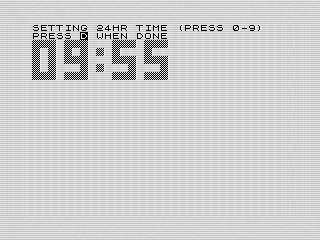 Flip Clock, Setting, ZX81 Screenshot, 2025 by Steven Reid
This is actually a pretty slick program, but it also shows how slow the print routine is. It takes almost a second to display the digits. Be patient! I really like it, but I do wish the display was a bit faster. If I were to make any changes, I’d probably move the digit display into machine code. The goal was to keep this in BASIC, and this is probably as good as it gets.
# A lot of work.
Although a simple program, I spent a lot of time building and testing different versions. I ran through probably sixteen iterations as I tried different ways of accomplishing the same thing. I used GenAI to help research ideas, but I spent much of the time explaining the ZX81’s constraints.
If I were to make changes, I’d reduce the character size and try to speed up the display. Adding an alarm would be cool. There are sound cards out there that would be neat to use. I also found a project during my research that used an external clock. That would be a fun project for another day.
---
Want to try it out? You can run the program, or view the code if you’d like to see how it works.