Helping Robots Find Kittens on the ZX81
I recreated robotfindskitten in ZX81 BASIC with 200 messages, a few tricks to keep things moving, and a robot looking for its kitten among random objects.
Helping Robots Find Kittens on the ZX81
Sometimes it is fun to write something simple. My latest ZX81 program recreates robotfindskitten, a little zen program about helping a robot find a kitten. Along the way, you bump into objects and discover what they are. Most aren't kittens, but finding out is part of the fun.
# A little search for a kitten.
The idea behind robotfindskitten is straightforward. You move a robot around a field of characters, checking objects until you find the kitten. Everything else gives you a little description. Some are strange, some are funny, and none are the kitten you are looking for.
That is pretty much the whole experience. There isn't a complicated set of rules to learn. You just wander around and see what you find. It seemed like a good fit for the ZX81, where a screen full of characters is already familiar territory.
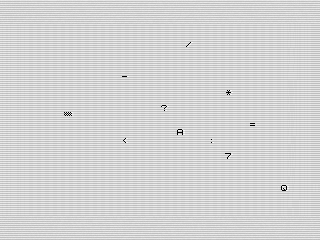 robotfindskitten opening screen on the ZX81.
I played a few versions on the web to get a feel for how it worked. I didn't have the game source to refer to while writing my version, so I built the Sinclair BASIC code from scratch. Playing the other versions gave me enough to work from, and mine should be close to the same experience.
It was a fun little zen program to code. It also runs sufficiently well on the ZX81. There are a few things going on behind the scenes to help with that, but the result is a simple little search for a kitten.
# Finding things that aren't kittens.
Each play has ten objects scattered around the screen. One is the kitten. The other nine are things you will have to investigate.
The characters don't tell you much on their own. You have to move over and try to take an object to discover what it represents. The description is the reward, even when you haven't found what you came for.
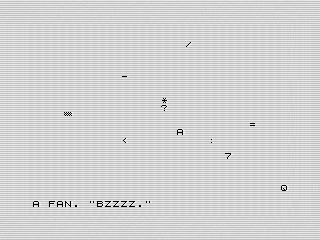 Checking an object during the search for kitten.
A lot of the charm comes from those descriptions. Without them, you would just be moving between random characters until you picked the right one. With them, there is a reason to check something else. You might find the kitten quickly, or spend a little longer discovering what everything isn't.
# Making room for 200 messages.
Although I wrote the game code myself, I used a selection of descriptions from the shared source for the messages. I didn't include all of them, and I added quite a few of my own. More than a quarter of the 200 messages in my version are ones I wrote.
Coming up with those was part of the fun. Once you have the program working, adding another odd object is an easy way to give it a little more personality.
I was surprised by how many messages I could fit into the program. There is probably room for a few more, but 200 seemed like a good place to stop. With only ten objects in each play, that gives the program plenty to choose from.
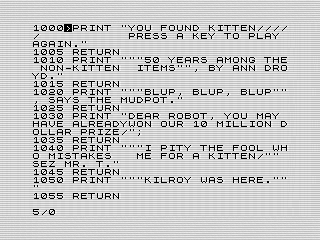 Some of the messages stored in the BASIC listing.
Almost all of the program ends up being the messages. Moving the robot and checking objects takes relatively little code. Once those parts were working, most of the remaining work was filling the program with things that aren't kittens.
# Trading some memory for speed.
I wanted to keep the play loop fairly quick. BASIC is more than capable of handling a program like this, but searching through a list of objects every time you move would add work that I could avoid.
For the objects, I use character codes from 1 through 63. That includes some of the ZX81 graphics as well as its other printable characters. Character 23, the asterisk, is reserved for the robot.
The useful trick is an array with an entry for each of those character codes. When I place an object on the screen, I save its message number in the entry for that character. Each object has a different character, so the character itself becomes a way to look up its description.
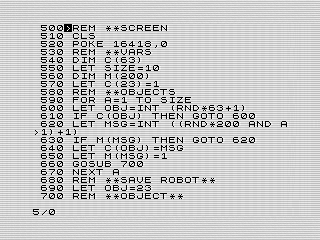 The initialization code sets up the objects and their messages.
This burns a little memory, since I make room for more entries than the ten objects need. In return, the play loop doesn't have to search through object coordinates to work out what the robot has found.
When the robot bumps into an object, its character code leads straight to the stored message number. The program can then display the description. The setup takes care of avoiding duplicate characters and repeated messages, leaving less to check while playing.
It is a small trade, but one that works well for this program.
# Making sure there is a kitten.
One of my favorite little bits of the setup uses Boolean math to make the first object the kitten:
620 LET MSG=INT ((RND*200 AND A>1)+1)
For the first object, A is 1. The condition A>1 is false, so the AND expression returns zero. Adding one gives message 1, which I reserve for the kitten.
For later objects, the condition is true, allowing the random value through. That produces a message number for the rest of the setup routine to check. The other checks prevent the kitten message from being reused and keep the descriptions from repeating.
I could have handled the first object with a separate branch, but I liked fitting that part into the calculation. It is a little BASIC trick that keeps the setup compact.
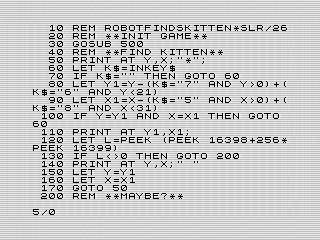 A look at the BASIC code behind robotfindskitten.
# Eventually, robot finds kitten.
Once the objects and messages are ready, there isn't much left for the program to do. Move the robot, check what it bumps into, and show the appropriate message. Eventually, one of those objects turns out to be the kitten.
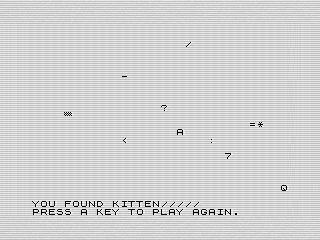 Robot finds kitten on the ZX81.
I thought about adding the little animation where the robot meets the kitten, but decided not to bother for now. It might be something to go back to. Finding the kitten works, but a little animation would be a fun way to finish.
Another idea was to let you choose whether to find a kitten or a puppy. Something a little different, and another excuse to play around with the program.
I enjoyed putting this one together. The idea is simple enough that I could concentrate on making it work well on the ZX81, then have some fun with the messages. I didn't expect to fit quite so many, which was a nice surprise.
For now, 200 messages should give the robot enough to investigate. The puppy might have to wait.
Want to try it out? You can run the program, or view the code if you'd like to see how it works.